≡ Menu

The Math of Refinancing

I used to think the concept of refinancing one’s mortgage was simple, but lately, I’m not so sure. Let me take you through the process with an example of how I’d approach this. You have a balance of $250K on your mortgage and are paying 6%, Your payment is $1791.
You find a 5% mortgage, and the payment is $1342. Wow, nearly $350 per month savings, right? A $3500 closing cost doesn’t look too bad, a 10 month breakeven. Ok, time to think about this. What’s missing? Well, when you told me the payment is currently $1791, I calculated you have 20 years left, on a mortgage that started at nearly $300K. So to understand the savings, you should look at the new rate, but use the remaining time from the old mortgage, got that? In other words, even though it’s a new 30 year mortgage, calculate the payment with the new rate, but a 20 year term. That will give you $1650. This is you actual savings, $140/mo. The $350/mo we first calculated comes at the expense of ten more years of the mortgage. The savings produce a breakeven of 25 months. This may still be worth going after, but it’s far less than you thought, and if you have any idea of moving before then it may not be worth the refinance. Any questions on this approach, post a comment, let me know.

Joe

{ 9 comments }

An Ides of June Roundup

Is it Sunday already? Where did the week just go? I don’t know, either, I just know it’s time to present my best reading this past week.

My friend Kay Bell asked Is it time to kill the mortgage interest tax deduction? Not that she was suggesting this was a good idea, she was offering her readers a look at Howard Gleckman’s proposal, writing at the Tax Policy Center’s TaxVox. I think that we need to first let the housing market recover along with the other financial markets. Remember, changes happen at the margin, taxpayers who close on a high mortgage today, counting on the tax deductibility of the interest may find that without that deduction, can’t afford the house. Those who haven’t bought yet would see an effective increase in the cost and therefore would only afford a lower value home. Tough change to introduce right now.

Anna Kronzer posted at Blogging for Change, To buy or not to buy: Kitchen Gadgets. This post overlaps Frugal, Uncluttering, and Cooking, three topics of interest to me. Anna offers a list of ten kitchen gadgets and her view of each. I didn’t agree with all of her conclusions, but that’s why there are so many gadgets out there, to each his own. Here’s my thought: Move all your gadgets to a different drawer or if that’s not practical, into a gallon size freezer bag. Each time you use one, leave it back in the regular spot. After a year, if you haven’t used something, it’s time to get rid of it for good.

At Smart On Money I read about 10 Things That Broke People Do (That Keep Them Broke). I love lists like this. They are a good how to/ how not to, and you can see if you are guilty of doing any of these things that make and keep people broke.

Jeff at Deliver Away Debt presented The Mega Money Tip List – 600 Money Saving Tips, if you read this list, over a few sittings, and don’t find at least a dozen tips, there may be no hope for you, sorry. Nice list Jeff, thanks for including one of my posts, much appreciated.

We’re nearly halfway through 2010 and all signs point to higher rates next year. Kelly Phillips Erb guested at Wallet Popper with a post titled 5 things you can do now to get ready for huge tax hikes in 2011. Tough times ahead, but I’d suggest not letting the tax tail wag the investing dog. Anything you do in advance of rising rates should be done with the big picture in mind.

By the way, the ides of March, May, July, and October are on the 15th, all other months it occurs on the 13th, but you knew that, right?

Joe

{ 1 comment }

Obama’s Many Moods

I think sometimes we’d like to see an emotional reaction from our leader. Is Obama too level-headed?

{ 0 comments }

Graduates of 2010

OMG! You graduated college. Congratulations! Last year I posted some advice that I heard Arnold Schwarzenegger at a commencement address he gave at USC.

This year, if you weren’t fortunate enough to have such a high profile speaker at your graduation, I’d like to step up and give you some advice of my own, guest posted at the TurboTax Blog, and titled New Grads: Four Tax Tips to Memorize Before Your New Job Starts.

Graduates of 2010, I wish you well.

Joe

(FTC disclaimer – This is where I’m supposed to tell readers if I was paid or compensated with anything of value for the reference to TurboTax. Nope. I actually do this for the sheer joy of helping people and sharing what i know. Although, a nice sweatshirt would be appreciated, x-large. Does the FTC give out t-shirts? You can send me one too)

{ 1 comment }

Evernote on the iPad

Note – a kind reader gave me a better recommendation to use Evernote on the iPad and the advice now appears in a new article Evernote on the iPad Revisited.

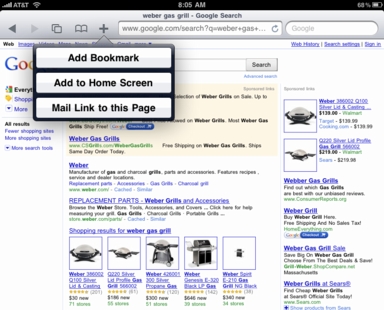
My regular readers will know that I’m a Mac user (a fan but not a fanboy) and lately, an avid user of the Evernote application. It’s no surprise that when I bought my iPad, Evernote was one of the very first apps I loaded. I find Evernote incredibly useful, an easy way to access data at my fingertip on a screen much easier to read than either the iPod Touch or my Blackberry. One issue that some have is trying to save a web page to Evernote while browsing. On your Mac or PC this is easy, add-ons for the browser handle this with a click. The Safari iPad browser just offers this:

Your choices while in Safari are to add it to the Safari Bookmarks, add an icon to the home screen or email the link. Of course you can email the link to your Evernote account which is easy, but a two step process. I recently discovered what I think is an easier method. Take a look:

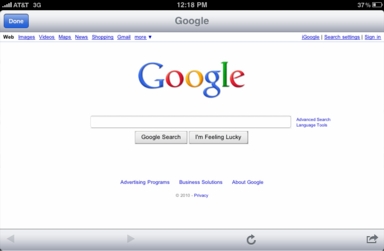
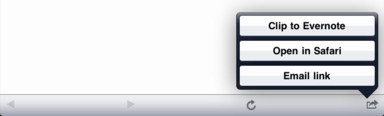
If you first set up an Evernote note which links to Google (i.e. just add a note with http://www.google.com to your first Evernote notebook) now when you go to Google this way, you are not in Safari, and you can see the top search bar is gone, we are in Evernote’s own browser. What you gain is that lower bar, arrows for prior or next screen, reload, but most important, the new choices:

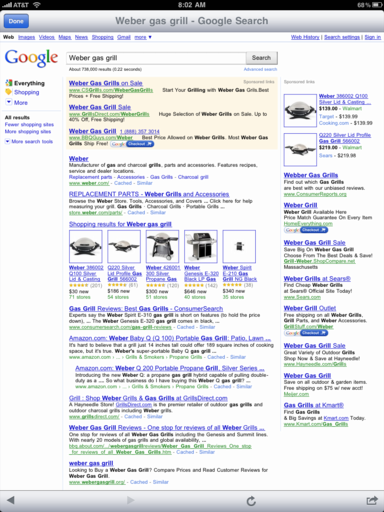
You are still able to email the link, or open in Safari, but most important, you can save the page to Evernote directly.Now, for the final image:

I can now continue my search, saving the screenshots I want, but easily going back to the search screen, via that left arrow, all the while staying within the convenient Evernote browser. I was searching for a way to do this for some time, and until I discovered this process, saving from the iPad was a multistep process. Of course you can use whichever search engine you wish, the process is the same. If you pass this tip on, please let people know you heard it here first.

Joe

{ 8 comments }